
Before loading an LTO tape cartridge — especially one that has just been transported or has been dropped — check that its leader pin is sitting correctly. A displaced leader pin can damage a drive beyond repair or leave a tape stuck inside it, so it is always worth a few seconds' inspection first.
TABLE OF CONTENTS
- Overview
- Step 1 — Check the leader pin position before loading
- Step 2 — Look for other signs of a displaced pin
- Step 3 — Find your cartridge serial number
- What to do if you suspect a problem
- Related articles
- Frequently asked questions
Overview
Every LTO tape cartridge has a small metal leader pin clipped inside its case, just behind the cartridge door. When a tape loads, the drive's threading mechanism reaches in, grips this pin, and uses it to pull the tape leader out of the cartridge and thread it around the drive's internal path. For this to work reliably, the pin must be resting exactly where the cartridge was designed to hold it.
Rough handling — being dropped, knocked, or jostled during transport — can shift the pin out of its resting position. Because the case is closed, this is not always obvious just from looking at the outside of the cartridge, so it is worth checking through the small door before loading any tape that has recently travelled or taken a knock.
Step 1 — Check the leader pin position before loading
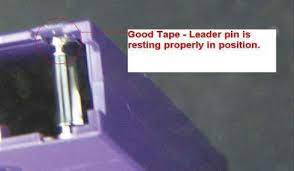
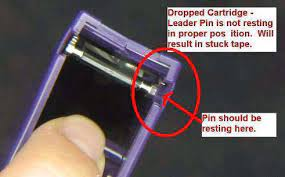
Always check the leader pin after a cartridge has been shipped, carried between sites, or dropped — even if the outer case looks undamaged. A few seconds spent looking through the door can save days of drive downtime.
Step 2 — Look for other signs of a displaced pin
If you cannot get a clear view of the pin itself, the following signs also point to a possible leader pin problem:
- Gaps in the case seam — inspect the rear and sides of the cartridge case. Any visible gap in the seam can indicate the pin has been dislodged inside.
- A damaged door or write-protect switch — a cartridge that has been dropped hard enough to displace the pin will often also show damage around the door or write-protect switch.
- The tape fails to load, or another cartridge loads fine — if one cartridge repeatedly fails to load while others load normally in the same drive, suspect the cartridge rather than the drive.

Step 3 — Find your cartridge serial number
If you need to report a suspect cartridge to Symply Support, have its serial number ready. It is printed directly on the underside of the cartridge case.
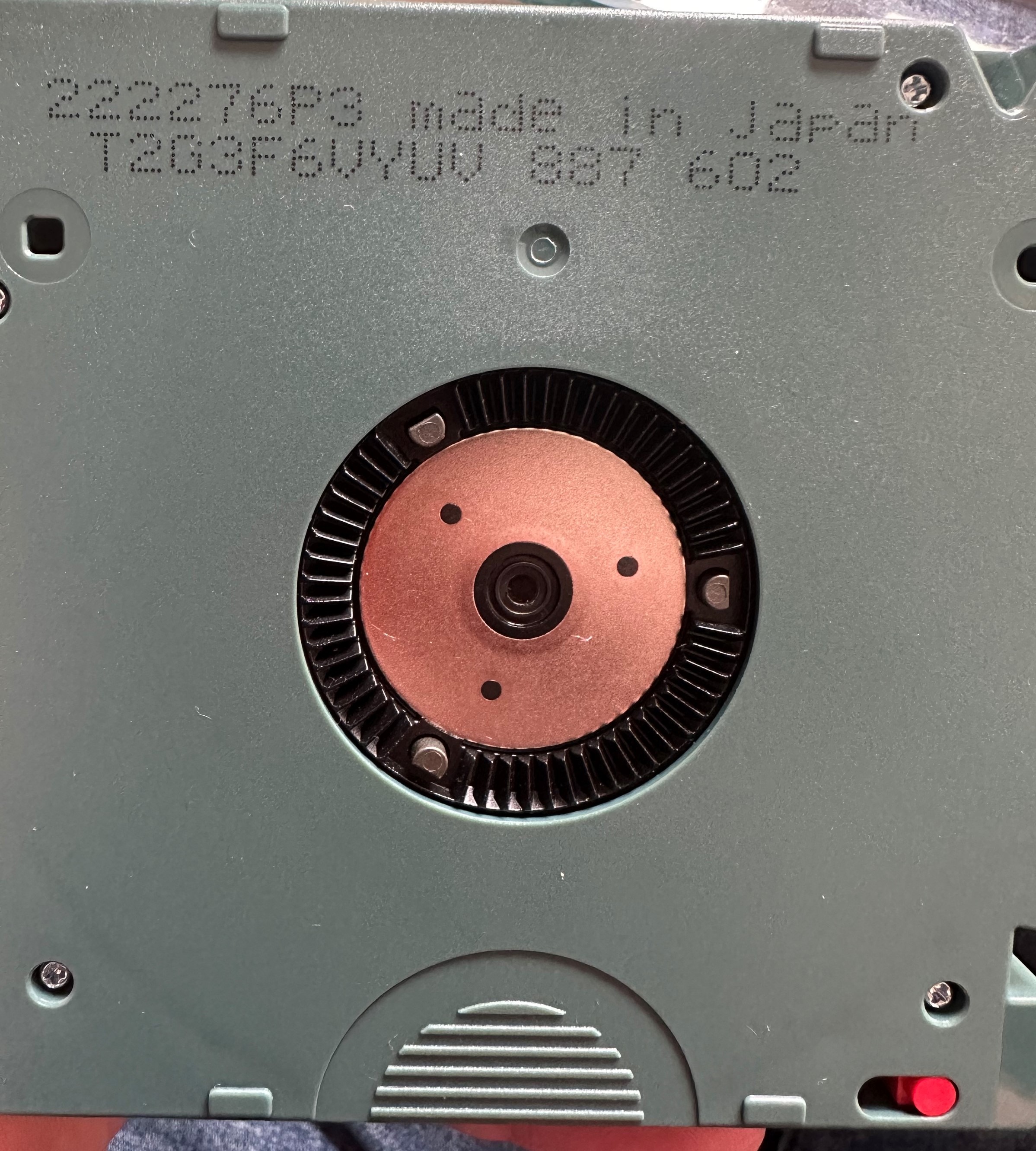
The serial number is a short alphanumeric code — in the example above, T2G3F6VYUV. Quote this number when you contact Symply Support so the specific cartridge can be tracked.
What to do if you suspect a problem
- Do not load the cartridge. If the leader pin does not look correctly seated, set the cartridge aside rather than attempting to load it.
- Do not try to reposition the pin yourself. The cartridge case is not designed to be opened, and attempting to do so is likely to cause further damage.
- If a tape is already stuck in the drive, do not force an eject. Follow the steps in Failed Cartridge Loads (or does not unload properly), and contact Symply Support if the tape still will not eject.
- Note the serial number (Step 3 above) and submit a support ticket describing what you observed, including whether the cartridge was recently transported or dropped.
Related articles
- Failed Cartridge Loads (or does not unload properly) — further detail on leader pin issues and what to try if a tape will not load or eject.
Frequently asked questions
What exactly is the leader pin?
It is a small metal pin clipped to the end of the tape inside the cartridge, just behind the door. The drive's threading mechanism grips this pin to pull the tape out of the cartridge and route it around the drive's internal tape path. Without the pin correctly seated, the drive cannot thread the tape.
Can I fix a displaced leader pin myself?
No. Do not attempt to open the cartridge case or reposition the pin. Set the cartridge aside and contact Symply Support with the cartridge's serial number.
I already loaded the cartridge — what now?
If the tape loaded successfully and is working normally, no action is needed. If the tape is stuck or the drive is reporting a load error, do not force an eject — follow Failed Cartridge Loads (or does not unload properly) and submit a support ticket if the problem does not resolve.
Why does a stuck tape take so long to resolve?
A tape stuck on a displaced leader pin cannot be safely removed by resetting or power-cycling the drive. It requires manual removal, which means the drive has to be returned to our UK facilities — a process that can take several days. Checking the pin before loading is the best way to avoid this altogether.
Where do I find the cartridge serial number?
It is printed on the underside of the cartridge case (see Step 3 above). Quote this number whenever you report a suspect cartridge to Symply Support.
If you have any questions please submit a [support ticket]